

Smarter Verification and Object Management for Regulated industries


Smarter Verification & Object Management with Muffins
Written by Muffins Team
Imagine this: a pharma system displays the wrong dosage, an aircraft interface wrongly reads the altitude, or a banking app misplaces a decimal. In regulated industries, even the smallest slip is not just a bug—it is a compliance failure with billion-dollar worth disaster.
1.Verification is a regulatory mandate, not a QA hygiene

Flow of the blog
- #1. Verification, a regulatory mandate
- #2. Muffins : Verify as you create
- #3. Muffins : Preset + Scalable Verification
- #4. Whats next on Muffins
In highly regulated industries, minor details like a single misaligned decimal point or a navigation reading off by mere pixels can trigger disastrous failures—patients receiving wrong dosages, aircraft navigation errors, or financial transactions processed incorrectly. When software supports and controls critical systems, verification is not just best practice—it is a regulatory mandate with zero escape for defects.
Yet in most test automation tools, verification is an afterthought— requiring extensive custom coding, complex scripting, or manual validation steps that become bottlenecks. Muffins simplifies verification for testers and QA teams - helping them verify UI elements with precision, manage test objects intelligently, and maintain conflict-free test environments.
2.Muffins: Real-Time Verification during Test creation
Traditional smoke tests simply check if a page loads or a button clicks, but cannot address regulatory requirements that demand granular, precise verification. Medical device software must meet FDA guidelines, aviation systems must comply with FAA requirements, and SOX compliance is mandatory for financial reporting—each demanding rigorous testing protocols. A single verification failure can trigger regulatory investigations, heavy fines, and loss of company reputation.
Muffins integrates verification directly into the test creation process—making it as intuitive as recording a user interaction. Whether you are testing in healthcare, aerospace, or managing rapid UI changes in fintech, or SaaS, Muffins ensures verifications are both precise and easy to manage.

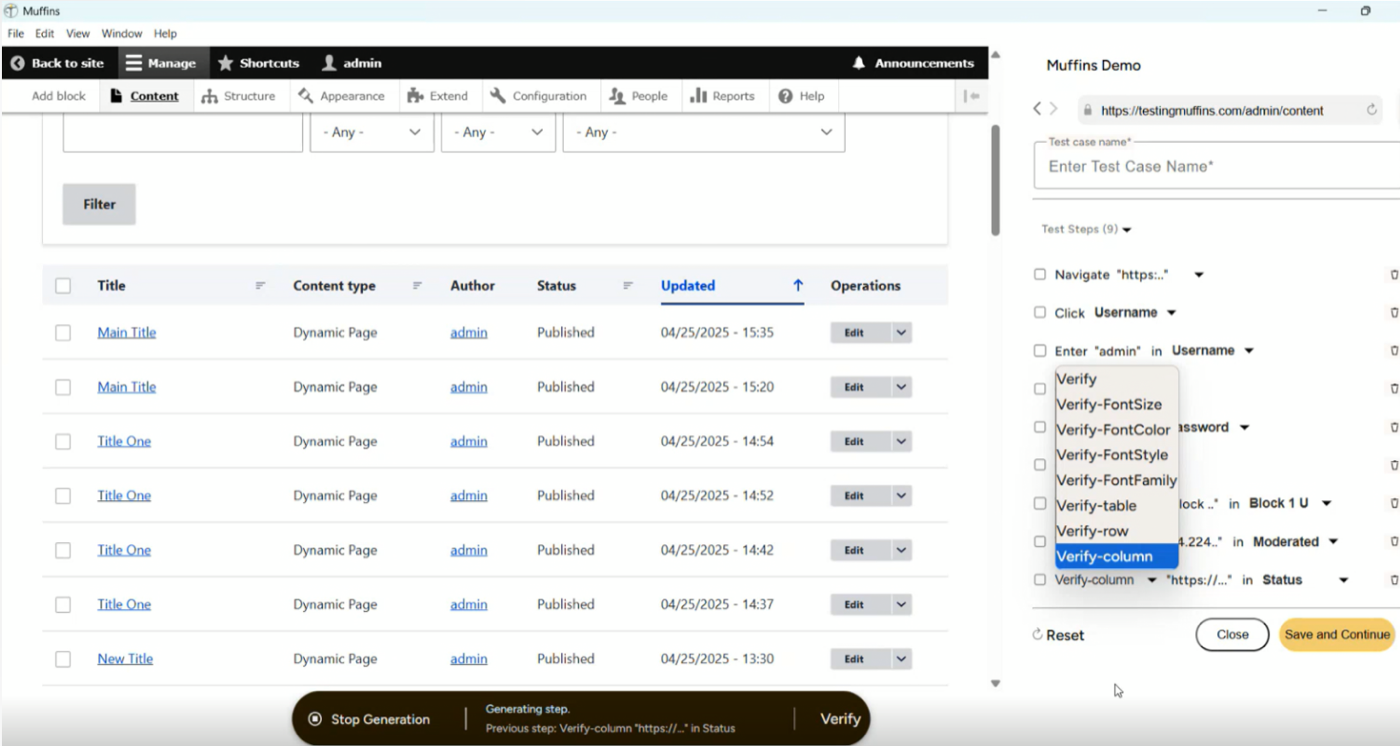
As testers interact with the application—clicking buttons, filling forms, navigating interfaces—they can instantly add verification steps without breaking workflow. Simply click any UI element, and Muffins presents a comprehensive "Verify" dropdown with contextually relevant options such as Verify Text, Verify Font Size, Verify Table, Verify Row, Verify Column or Verify Cell. The system instantly captures current values, enabling precise validation without writing a single line of code.
Want to confirm critical error messages appear in the right font size for accessibility compliance? Select "Verify Font Size" and Muffins instantly captures and locks the specification. Need to confirm that sensitive data appears in the correct table position for audit trails? Table verification options specify not just that data exists, but exactly where it should appear. This real-time approach eliminates the traditional disconnect between test recording and verification setup.
2a. Advanced Verification Capabilities on Muffins
Text Elements – Font family verification
Muffins goes beyond simple presence checks to include font family verification—crucial for applications where typography compliance is mandated, like healthcare portals or government systems with strict design standards.
Tables – Verify Row, Verify Column, Verify Table, Verify Cell
Enterprise applications rely heavily on tabular data. Muffins offers granular options like Verify Row, Verify Column, Verify Cell, and Verify Table —a fantastic value add for financial dashboards where the order of transactions must be verified, or healthcare systems where patient data must appear in specific grid positions for compliance.
It is also easy to confirm whether a dynamic row (e.g., “Status: Approved”) appears in the expected location—say, the 5th row of a grid. This is especially useful when validating:
- Tabular data in admin dashboards
- Transaction order in audit logs
- Custom views in enterprise apps
3. Muffins: Preset Verification & Scalable Verification
3a. Preset Verification
We are consciously building a library of standard preset verifications and expanding it based on clients’ feedback—ensuring new options address real-world needs without creating maintenance overhead.
3b. Scalable Verification through Smart Object Management
Verification is only as good as the underlying object management system behind it. In complex enterprise applications with 100s of pages and 1000s of UI elements, maintaining a clean, accurate object repository is crucial.
The common problem
In many no-code or low-code tools, the same UI element often gets stored multiple times in the object repository, because of small variations. This leads to unpredictable tests, referencing different versions of the same object. Verification steps may pass in one context but fail in another, because the repository has many duplicates or mismatches.
Muffins solution
Muffins mimics humans and how they naturally recognize objects – using labels, context, and visual cues. Instead of relying on technical locators like XPath or HTML attributes, Muffins uses a combination of object labels, surrounding context, and proprietary algorithms. Every interaction is stored with a highlighted screenshot, so testers know exactly what was captured.
When Muffins encounters the same object again, its backend logic decides whether to overwrite the existing entry or create a new one. If all key properties (label, URL, position, etc.) match, the object is updated; if not, a new object is created. For testers, this happens seamlessly—no duplicate clean-up, no locator confusion, no manual management.
Visual-first, human-like experience
When creating or editing tests, users browse objects by name and image, not cryptic selectors. Muffins’ visual-first repository makes it easy to pick the right element, even when labels repeat across pages. This approach not only prevents mis-selections but also opens automation to manual testers and business users, not just automation engineers.
Enterprise-scale impact
For large, dynamic applications with hundreds of pages, Muffins keeps repositories clean, avoids object bloat, and ensures verification steps remain accurate and stable. By embedding visual intelligence directly into object management, Muffins delivers:
- Cleaner object reuse
- Minimal object bloat
- Faster, more reliable test execution
- Easier debugging
- More maintainable test suites
This combination of scalable verification and human-like visual intelligence makes Muffins the most suitable QA for enterprise environments where UI is very complex and regulatory scrutiny needs to be accurate & auditable.
4.What’s coming next on Muffins
Software is increasingly becoming integral to high-stakes industries navigating complex compliance requirements—from healthcare systems managing patient care to financial platforms processing global transactions. Precise automated verification has become more critical than ever.
We are strengthening Muffins’ verification and object-handling capabilities with:
- Expanded preset verification types
- Smarter auto-suggestions based on previous test patterns
- Enhanced support for multi-language UIs and accessibility verifications
Ready to transform your compliance testing?
In regulated industries, verification failures are not just bugs —they are compliance risks, financial penalties, or safety hazards. Muffins can help your teams turn verification from a bottleneck into a safeguard, ensuring compliance without slowing the delivery.
Connect with us at sales@muffins.ai for a personalized demo to experience how scalable verification and smart object management can streamline compliance testing and accelerate secure releases.
(Muffins.AI is the no-code enterprise grade test automation platform with intelligent test design at its core. Our powerful generative test design module enables deeper exploration of your web app, uncovering issues early, while execution and defect resolution are fully automated. The outcome? Higher coverage, faster releases with uncompromising quality. You may love to explore our outcome-guaranteed engagement model.)
Frequently asked questions
In industries governed by FDA, ISO 13485, IEC 62304, HIPAA, and similar standards, verification is not just about finding bugs, but also is about producing repeatable, traceable, and auditable evidence that systems behave safely under all conditions. Even minor UI errors like an incorrect dosage display, a misplaced decimal, or inaccurate table data can lead to patient safety risks, compliance violations, and regulatory penalties.
A no-code test automation platform like Muffins enables domain experts, QA teams, and compliance stakeholders to define and maintain granular verification checks without relying on fragile custom code.
Smarter verification in Muffins allows teams to validate precise UI checks like text, font size/family, table rows/columns/cells – in real time as tests are created, without any code. This goes far beyond basic presence checks to meet strict regulatory requirements and accuracy demanded by safety-critical industries like medical devices/healthcare, finance, and aerospace.
Muffins mimics humans and how they naturally recognize objects – using labels, context, and visual cues. Instead of relying on technical locators like XPath or HTML attributes, Muffins uses a combination of object labels, surrounding context, and proprietary algorithms. Every interaction is stored with a highlighted screenshot, so testers know exactly what was captured. This prevents object bloat, keeps repositories clean, and makes tests more stable and maintainable.
Muffins intelligently matches key properties such as label, position and URL - and confirms them visually using screenshots. When a matching object already exists, Muffins updates it automatically; if it does not, it creates a new object. This eliminates duplicate objects and the locator confusion common in traditional tools.
Yes. The no-code interface of Muffins lets manual testers and business users add sophisticated verifications (for example Verify Row, Verify Cell, Verify Table) simply by interacting with the UI. Real-time capture and visual object repository make this whole process intuitive.
Absolutely. Its scalable verification and smart object management handle hundreds of pages and thousands of elements while keeping tests reliable. Upcoming features will expand support for dynamic UIs, multi-languages, and accessibility-focused interfaces.
You can request a demo directly here https://www.muffins.ai/contact. During the demo, you can see real-time verification, smart object management, and how Muffins streamlines compliance testing for your team.
Subscribe today.
Thank you!
Verification Is a Regulatory Mandate
Real-time Verification on Muffins
Preset + Scalable Verification on Muffins
Whats Next on Muffins
More related blogs

Verificación Personalizada de Documentos y Texto para Fabricantes establecidos en México de Alto Nivel
- February 3, 2025
Pruebas Manuales, Automatizadas e Híbridas – en la Aseguramiento de la Calidad de Software
- February 3, 2025
Más allá de Selenium y Playwright: Muffins ofrece simplicidad sin código para la automatización de pruebas
- June 2, 2025